Natural Language Input
TaskNotes includes a natural language processor that parses task descriptions to extract structured data. The same engine powers the task creation modal, inline task conversion, and bulk operations. Typing "Prepare quarterly report due Friday #work high priority" automatically sets the due date, tag, and priority.
What Gets Extracted
The NLP engine recognizes:
| Pattern | Example | What it sets |
|---|---|---|
| Dates and times | "tomorrow", "next Friday", "January 15th at 3pm" | Due date, scheduled date |
| Priority | "high priority", "urgent", or trigger !high |
Priority level |
| Status | "open", "in-progress", "done", or trigger *in-progress |
Status |
| Tags | #work, #urgent |
Tags list |
| Contexts | @home, @office |
Contexts list |
| Projects | +project or +[[Project Name]] (for names with spaces) |
Projects list |
| Time estimates | "2h", "30min", "1h30m" | Time estimate |
| Recurrence | "daily", "weekly", "every Monday" | Recurrence pattern |
| Custom properties | effort: high or effort: "very high" (quoted for multi-word) |
Custom field values |
NLP parses common patterns during capture; fields can be refined in the modal afterward.
Trigger Characters
Each extractable field has a trigger character that activates parsing and auto-suggestions:
| Field | Default trigger | Example |
|---|---|---|
| Tags | # |
#work |
| Contexts | @ |
@home |
| Projects | + |
+[[Project Alpha]] |
| Status | * |
*in-progress |
| Priority | ! (disabled by default) |
!high |
| Custom properties | fieldname: |
effort: high |
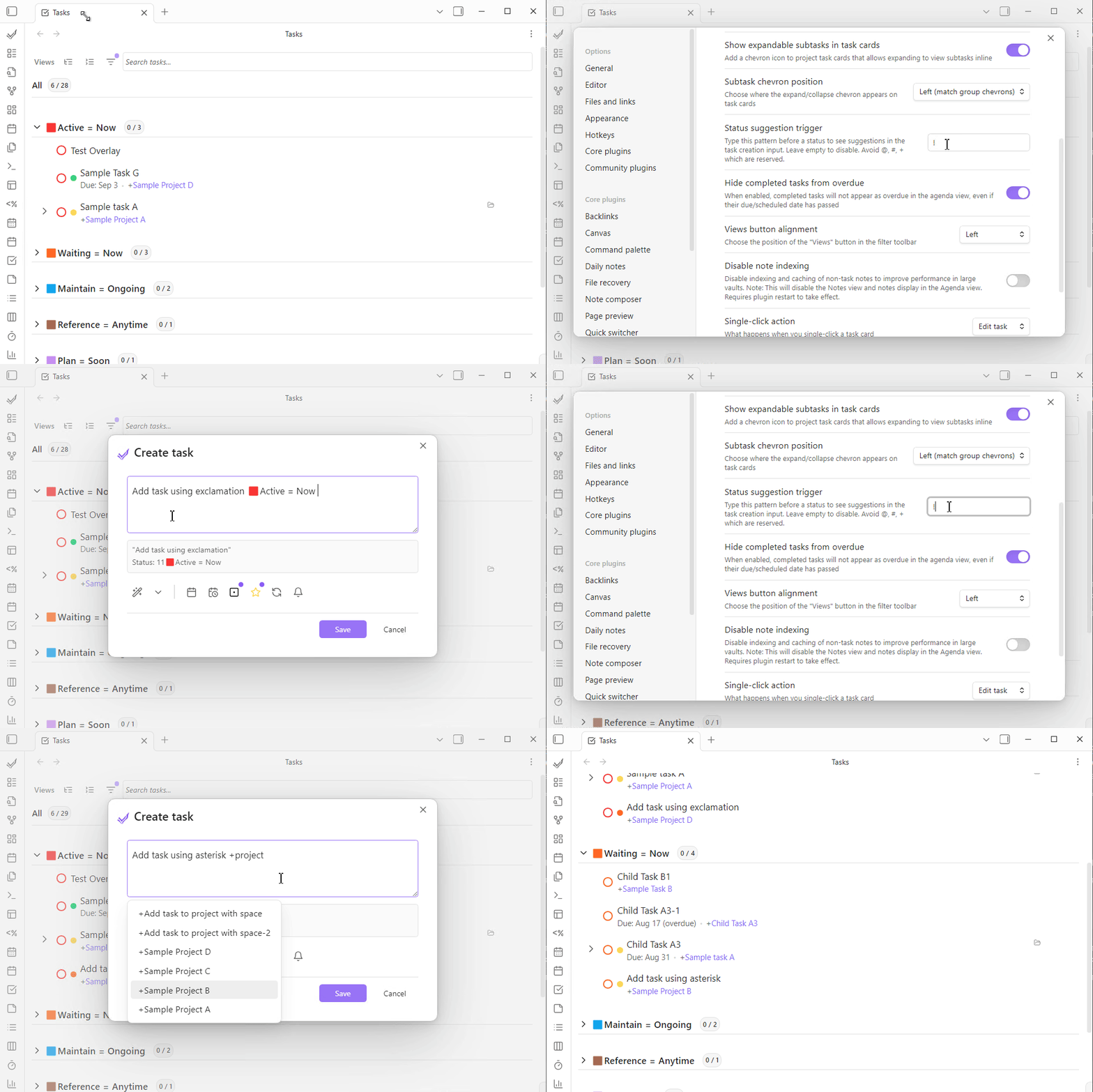
Triggers are configurable in Settings > Features > NLP Triggers. Each trigger supports up to 10 characters and can include trailing spaces (e.g., "def: " for a custom field). When the tag trigger is set to #, Obsidian's native tag suggester is used.
Auto-Suggestions
When you type a trigger character in the NLP input field, an autocomplete menu appears with available values. Navigate with arrow keys and select with Enter or Tab.
Project Suggestions
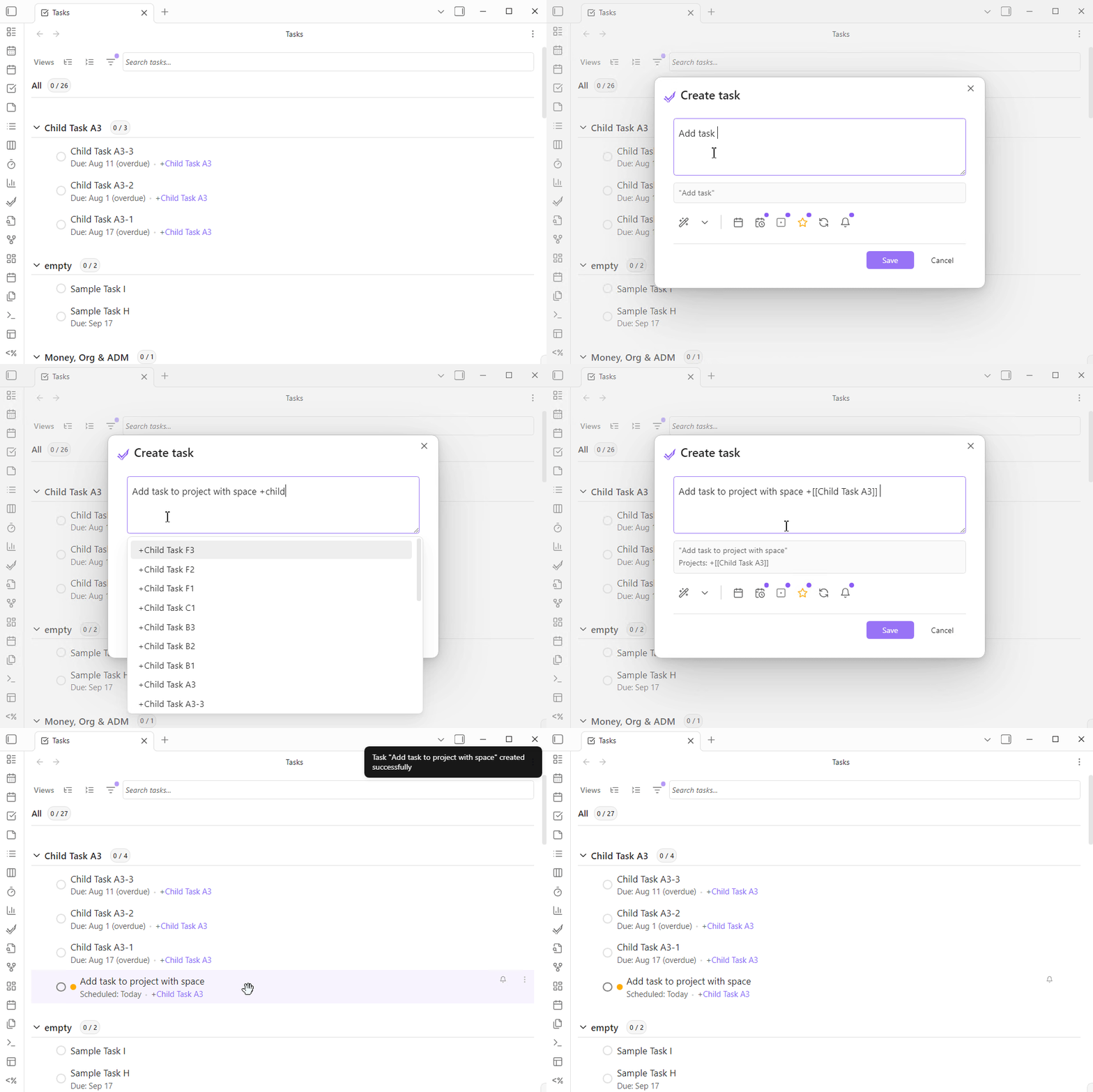
When typing +, you see up to 20 suggestions from your vault's markdown files. Suggestions display additional information to help identify files:
project-alpha [title: Alpha Project Development | aliases: alpha, proj-alpha]
meeting-notes [title: Weekly Team Meeting Notes]
simple-project
work-file [aliases: work, office-tasks]
Project suggestions search across:
- File names (basename without extension)
- Frontmatter titles (using your configured field mapping)
- Frontmatter aliases
- Optional filtering by required tags, folders, and a specific frontmatter property/value defined in Settings > Appearance & UI > Project Autosuggest
Selecting a project suggestion inserts it as +[[filename]], creating a wikilink to the file while maintaining the + project marker that the parser recognizes.
Enhanced Project Auto-suggester
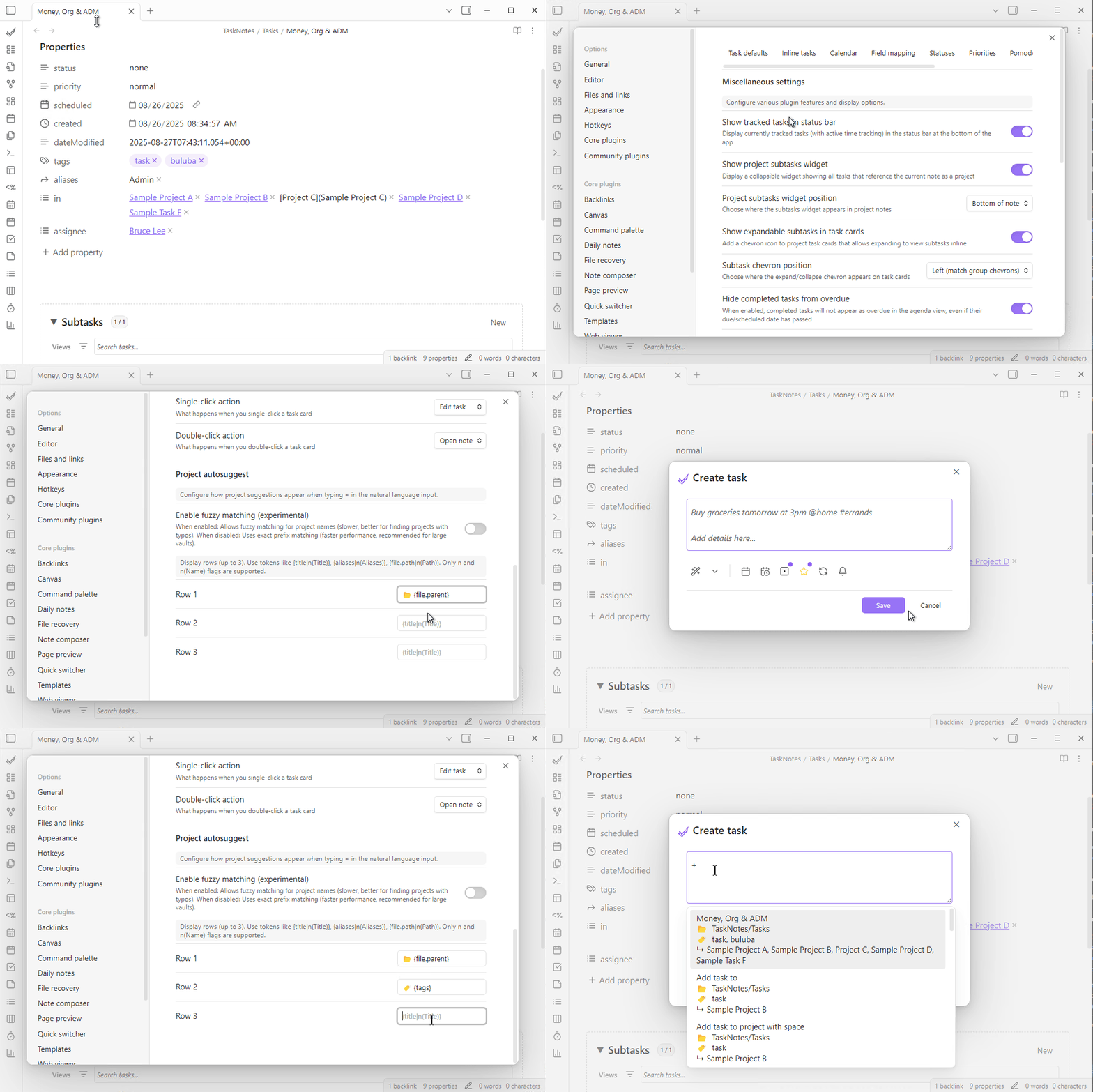
Project suggestions can display configurable multi-row cards and support smarter search. Configure up to 3 rows using a simple token syntax in Settings > Appearance & UI > Project Autosuggest.
Properties: file.basename, file.name, file.path, file.parent, title, aliases, and any frontmatter key.
Flags:
norn(Label)— show the field name/label before the values— include this field in+search (in addition to defaults)
Literals: you can mix in fixed text or emojis between tokens.
Examples:
{title|n(Title)}→ Title: Alpha Project🔖 {aliases|n(Aliases)}→ 🔖 Aliases: alpha, proj-alpha{file.path|n(Path)|s}→ include path in+search as well as display it
Search behavior:
- Defaults:
+search always includes file basename, title (via your field mapping), and aliases |sflag: add more searchable fields on top of the defaults (e.g.,file.pathor a custom frontmatter key likecustomer)- Fuzzy: optional fuzzy matching can be enabled in settings for broader, multi-word matches
Performance tips:
- Keep rows to three or fewer for clarity and performance (the UI supports up to 3)
- Prefer specific searchable fields with
|son large vaults
Status Suggestions
When typing the status trigger character (default *), you see suggestions for all configured status options. For example, typing *in shows "In Progress" if that is one of your configured statuses.
Rich Markdown Editor
The task creation modal uses a rich CodeMirror markdown editor instead of a plain textarea.
- Live Preview: Rendered markdown preview as you type
- Syntax Highlighting: Code blocks, links, and formatting are highlighted
- Wikilink Support: Create links to other notes using
[[Note Name]]syntax - Keyboard Shortcuts:
Ctrl/Cmd+Entersaves the task;EscorTabto navigate out - Placeholder Text: Shows an example task (e.g., "Buy groceries tomorrow at 3pm @home #errands") when the editor is empty
Language Support
The NLP engine supports multiple languages: English, Spanish, French, German, Italian, Japanese, Dutch, Portuguese, Russian, Swedish, Chinese, and Ukrainian.
Parser language is configured in TaskNotes settings (nlpLanguage). Per-request locale is not currently supported.
Configuration
| Setting | Location | What it controls |
|---|---|---|
| NLP Triggers | Settings > Features | Trigger characters for each field type |
| Project Autosuggest | Settings > Appearance & UI | Project card rows, search fields, fuzzy matching, filters |
| NLP Language | Settings > General | Parser language |
API Access
For programmatic access to the NLP parser, see the NLP API — HTTP endpoints for parsing text and creating tasks from natural language descriptions.
Related
- Task Management — Task creation modal, projects, dependencies
- Inline Task Integration — Editor widgets, instant conversion
- Bulk Tasking — Batch operations that use the NLP engine
- Custom Properties — Register custom fields that NLP can extract